SRTLA Bonding Explained: How Multi-Connection Streaming Works
SRTLA bonds multiple internet connections into one stable stream. Learn how it works, why it beats RTMP on cellular, and how to pick the right bitrate for IRL streaming.
If you have ever watched an IRL stream where the broadcaster walks into a subway and keeps going without missing a beat, you have seen SRTLA bonding in action — even if you did not know it by name.
SRTLA is a transport layer that combines multiple internet connections into a single stream. The key word is "bonding": instead of picking one network and hoping it holds, SRTLA spreads packets across every available link simultaneously. When one link degrades, the others carry the load without the encoder noticing.
This article explains how bonding works at a high level, how it differs from plain SRT and RTMP, and what you need to know to get value from it as an IRL or mobile streamer.
SRT vs SRTLA: what changes
SRT (Secure Reliable Transport) is a UDP-based protocol designed for unstable networks. It adds encryption, packet retransmission, and congestion control on top of raw UDP, making it far more resilient than RTMP when packets drop or reorder. But SRT is still a single-connection protocol: you send from one IP to one server, and if that path hiccups, SRT tries to recover what it can.
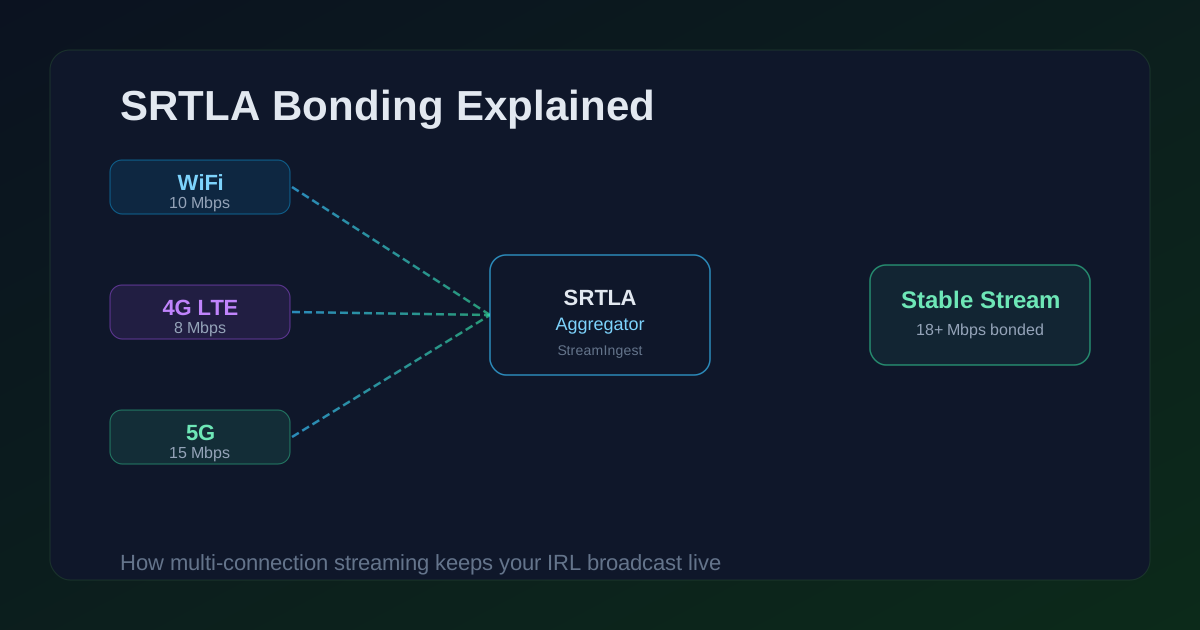
SRTLA extends SRT with a listener aggregator layer. The encoder opens multiple SRT connections — one per network interface (WiFi, a 4G SIM, a 5G SIM) — and all of them land at the same SRTLA aggregator on the server side. The aggregator reassembles the packets as if they came from a single sender. From the encoder's point of view, it is one stream; from the network's point of view, the load is spread across three or four pipes.
- Plain SRT: one connection, one recovery path. If the single path fails badly enough, the stream falls behind or stops.
- SRTLA: multiple connections in parallel. Packet loss on any single link is covered by the others.
- RTMP: TCP-based, no built-in packet recovery beyond TCP retransmits. A brief stall can cause buffer build-up that takes seconds to drain.
How bonding actually distributes packets
The encoder sends each SRT packet on whichever link has spare capacity at that moment. The SRTLA aggregator tracks the sequence numbers across all connections and reorders packets before handing them to the SRT receiver. From the SRT receiver's perspective, the stream looks like a normal SRT session — it just has more paths to pull from.
This matters because bonding is not the same as failover. Failover is reactive: you use link A, it fails, you switch to link B. Bonding is proactive: you use A and B simultaneously, so if A degrades, B already has packets in flight and the encoder never stalls waiting for a reconnect.
- The encoder allocates bitrate across all active links dynamically — no manual per-link bitrate split needed.
- If one link disappears entirely (airplane mode, dead zone), the aggregator detects the gap and the remaining links absorb the full bitrate.
- Adding a link mid-stream is possible on some implementations — useful for walking back into WiFi range.
When bonding matters and when it does not
Bonding pays off in environments where no single connection is reliable enough on its own. Walking and cellular is the textbook case: a single LTE band can drop 30% of packets in a dense venue, but two LTE connections on different carriers or bands rarely fail at the same moment.
In a studio with a wired gigabit connection and a UPS, bonding adds nothing. The single connection is already more reliable than you will ever need. Introducing SRTLA there just adds complexity for no gain.
The inflection point is roughly: if you would trust the connection alone to run a 4-hour IRL walk through a city center, you probably do not need bonding. If you have ever had to apologize to chat for a disconnection during a walk, bonding is worth evaluating.
- IRL walking through mixed WiFi and cellular coverage: strong case for bonding.
- Driving streams or vehicle mounts where one carrier drops in tunnels: good case for bonding.
- Indoor wired home studio with backup power: no case for bonding.
- Drone or remote location with a single satellite uplink: bonding helps only if you have two uplinks.
Picking a bitrate that bonding can actually sustain
Bonding does not multiply your available bandwidth; it aggregates what each link can deliver. If your WiFi can push 10 Mbps and your 4G can push 8 Mbps, the theoretical ceiling is around 18 Mbps — but real-world overhead, retransmissions, and congestion mean you should not use more than 60–70% of that ceiling.
A practical workflow: run a speed test on each link separately in the environment you plan to stream from, not your home network. Add the upload speeds and multiply by 0.6 for a conservative target bitrate. Then test at that bitrate during a private or unlisted stream before going live.
For typical IRL on 4G + WiFi, a combined 6–10 Mbps upload budget usually produces 4–6 Mbps of actual encoding headroom at 720p60 or 1080p30 — enough for a clean stream with retransmission capacity to spare.
Pre-Flight Checklist
- Test each connection's upload speed separately in the location you plan to stream, not at home.
- Set your encoding bitrate to no more than 60% of the combined measured upload headroom.
- Confirm your SRTLA endpoint and stream ID are current before going live — endpoints can rotate.
- Run a 5-minute unlisted or private test stream before the main event to verify all links bond correctly.
- Monitor bitrate in your encoder dashboard during the first 60 seconds of the real stream.
Common Issues
One link connects but stream still drops intermittently
Check that all configured links are actually reaching the aggregator. Some firewalls block UDP on non-standard ports. Confirm your SRTLA endpoint allows the port you are using, and test each link in isolation by disabling the others.
Bitrate fluctuates widely despite multiple connections
You are likely using more bitrate than the weakest link can support during congestion. Lower your target bitrate by 20% and retest. The aggregator can only smooth out drops — it cannot create bandwidth that does not exist.
Stream is stable at home but fails on location
Home network speeds rarely predict outdoor 4G/5G performance. Run a fresh speed test on location before adjusting encoder settings. Carrier and frequency band vary significantly by area — a location that works on one carrier may not on another.
FAQ
Yes. Your encoder application must support SRTLA output, not just plain SRT. Common apps that support it include Moblin (iOS), IRL Pro, and Belabox. OBS Studio supports plain SRT but not SRTLA natively — you would need a sidecar utility or a purpose-built plugin.
Most SRTLA implementations support as many connections as you can establish simultaneously. Three or four SIMs plus WiFi is technically feasible. In practice, managing that many connections adds complexity, and the marginal gain from a fourth link is usually small if the first three are healthy.
Belabox uses SRTLA on the hardware side. Larix Broadcaster supports SRT and can send to SRTLA endpoints. They are all implementations of the same SRTLA protocol or compatible variants — the interoperability depends on the server-side aggregator your host runs.
Yes. StreamIngest provides SRTLA ingest endpoints alongside plain SRT endpoints. Your dashboard shows both; use whichever one matches what your encoder supports. If your encoder supports SRTLA, that is the recommended path for IRL streaming.
Ready to stream on bonded connections?
StreamIngest provides SRTLA and SRT ingest endpoints, automatic fallback video, and real-time connection stats — built for IRL creators who need reliability, not excuses.